
Here’s a handy Android tip published by the How To Geek site on Friday that can help you prioritize which Wi-Fi network to use. This is useful if you live or work near Wi-Fi hotspots that you actually don’t want to connect to, for example.
In the Wi-Fi settings for [company]Google[/company] Android, you simply tap the menu button to see more options and choose Advanced Wi-Fi. There you’ll find an option called Wi-Fi Priority; tap it and you can move Wi-Fi networks up or down as you see fit.
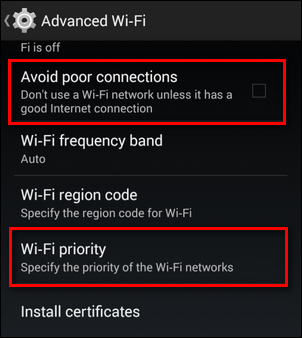
How To Geek also recommends enabling the option to Avoid Poor Connections, which makes sense: Why should your phone or tablet struggle to connect to a network with lower signal strength if there are better options available?
Unfortunately, this tip doesn’t seem to work with Android 5.0; at least not on the Nexus 5 that I’m using until my new Moto…
Ver o post original 100 mais palavras

 CURIOSIDADES NA INTERNET